
Products & E-commerceGPT Image 2UI MockuppastelKeynoteApple StyleFrosted GlassMinimalistGlassmorphism
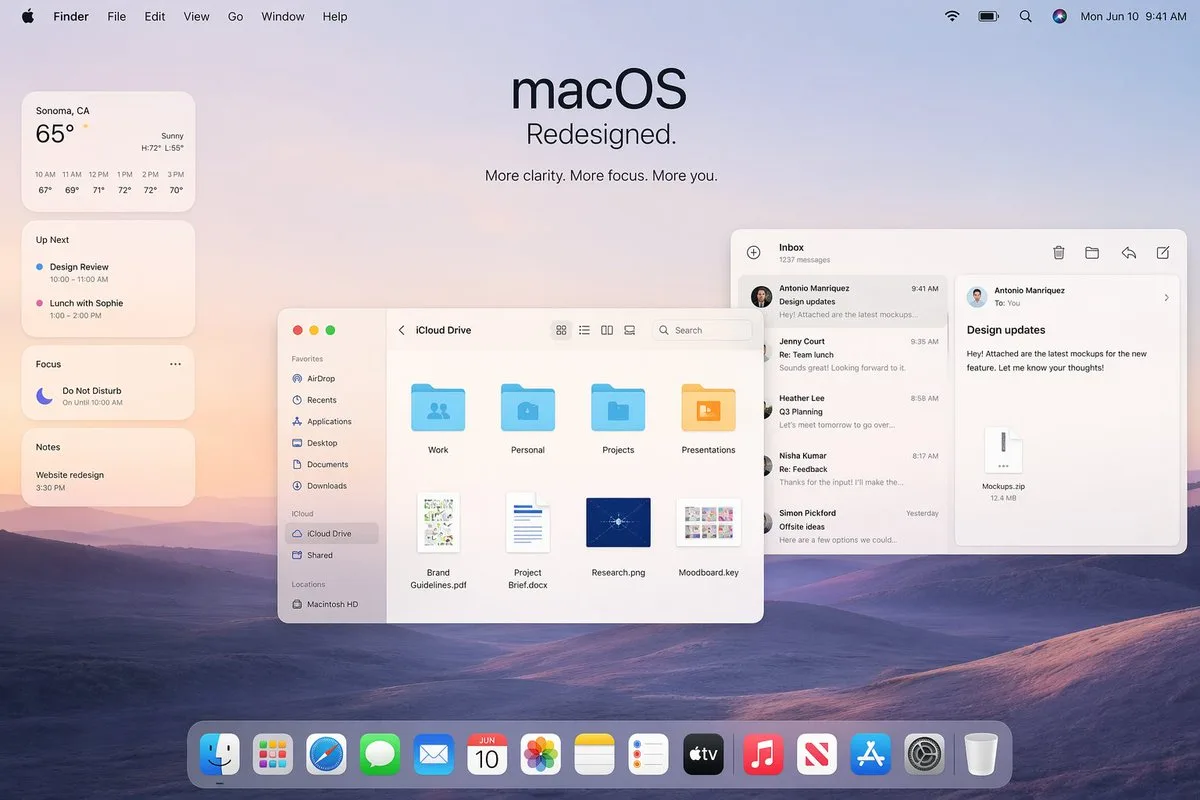
Mockup quảng bá giao diện macOS tái thiết kế
Prompt tạo mockup màn hình desktop quảng bá giao diện macOS mới phong cách Apple keynote với hình nền đồi núi pastel, hệ thống widget, cửa sổ Finder và ứng dụng Mail chi tiết. Thiết kế mang hơi hướng hiện đại, bóng bẩy với hiệu ứng kính mờ glassmorphism và thanh Dock tinh tế.
Bản tiếng Anh
A polished Apple-style macOS promotional desktop mockup shown as a full-screen screenshot, with a soft pastel dawn wallpaper of layered purple-blue rolling hills under a pale peach and lavender sky. Centered near the top is a large minimalist headline reading "macOS" with the subheadline "Redesigned." and a smaller line below that says "More clarity. More focus. More you." The top system menu bar is visible across the full width: Apple logo, Finder, File, Edit, View, Go, Window, Help on the left; Wi‑Fi, battery, search, colorful user icon, and the date/time "Mon Jun 10 9:41 AM" on the right. On the left side, stack 4 translucent rounded widgets vertically: a weather widget for "Sonoma, CA" showing "65°", "Sunny", high/low "H:72° L:55°", and 6 hourly temperatures from 10 AM to 3 PM; an "Up Next" widget with 2 calendar items, "Design Review" and "Lunch with Sophie" with times; a "Focus" widget showing "Do Not Disturb" and "On Until 10:00 AM"; and a "Notes" widget with the note "Website redesign" and time "3:30 PM". In the middle-left foreground, place a Finder window with rounded corners and a light frosted interface, titled "iCloud Drive". Include a left sidebar with 10 items total: Favorites with 6 items "AirDrop", "Recents", "Applications", "Desktop", "Documents", "Downloads"; iCloud with 2 items "iCloud Drive" and "Shared"; and Locations with 1 item "Macintosh HD". In the main Finder area show 8 file items arranged in a grid: 4 folders on the top row labeled "Work", "Personal", "Projects", "Presentations", and 4 documents on the bottom row labeled "Brand Guidelines.pdf", "Project Brief.docx", "Research.png", "Moodboard.key". Add standard macOS traffic-light window buttons and small view/search controls in the title bar. On the right side, overlap a Mail app window with a three-column layout. The left mail list column is titled "Inbox" and shows "1237 messages" plus 5 visible senders/messages: "Antonio Manriquez" with subject "Design updates", "Jenny Court" with "Re: Team lunch", "Heather Lee" with "Q3 Planning", "Nisha Kumar" with "Re: Feedback", and "Simon Pickford" with "Offsite ideas". The reading pane shows the selected message from Antonio Manriquez to You with subject "Design updates" and body text about attached mockups for a new feature, plus a file attachment card labeled "Mockups.zip" and "12.4 MB". Use clean SF Pro-style typography, subtle shadows, translucent glassmorphism panels, soft ambient lighting, and a premium Apple keynote aesthetic. At the bottom center, include a glossy translucent macOS Dock with 15 icons: Finder, Launchpad, Safari, Messages, Mail, Calendar showing "JUN 10", Photos, Notes, Reminders, TV, Music, News, App Store, Settings, and Trash. Composition should feel balanced, airy, realistic, and highly refined, like an official Apple macOS redesign announcement image.Bản tiếng Việt
Một bản mockup màn hình desktop quảng bá macOS phong cách Apple bóng bẩy được hiển thị dưới dạng ảnh chụp toàn màn hình, với hình nền bình minh màu pastel dịu nhẹ mô tả những ngọn đồi nhấp nhô nhiều tầng màu xanh tím dưới bầu trời màu đào nhạt và hoa oải hương. Căn giữa gần phía trên là tiêu đề lớn tối giản mang dòng chữ "macOS" cùng tiêu đề phụ "Redesigned." và một dòng nhỏ hơn bên dưới ghi "More clarity. More focus. More you.". Thanh menu hệ thống trên cùng hiển thị toàn bộ chiều rộng: logo Apple, Finder, File, Edit, View, Go, Window, Help ở bên trái; Wi‑Fi, pin, tìm kiếm, biểu tượng người dùng nhiều màu sắc và ngày/giờ "Mon Jun 10 9:41 AM" ở bên phải. Ở phía bên trái, xếp chồng 4 widget bo tròn bán trong suốt theo chiều dọc: widget thời tiết cho "Sonoma, CA" hiển thị "65°", "Sunny", cao/thấp "H:72° L:55°", và 6 mốc nhiệt độ theo từng giờ từ 10 AM đến 3 PM; widget "Up Next" với 2 mục lịch, "Design Review" và "Lunch with Sophie" kèm thời gian; widget "Focus" hiển thị "Do Not Disturb" và "On Until 10:00 AM"; cùng widget "Notes" với ghi chú "Website redesign" và thời gian "3:30 PM". Ở tiền cảnh phía giữa bên trái, đặt một cửa sổ Finder với các góc bo tròn và giao diện kính mờ sáng màu, mang tiêu đề "iCloud Drive". Bao gồm một thanh bên trái với tổng cộng 10 mục: Favorites với 6 mục "AirDrop", "Recents", "Applications", "Desktop", "Documents", "Downloads"; iCloud với 2 mục "iCloud Drive" và "Shared"; và Locations với 1 mục "Macintosh HD". Trong khu vực Finder chính, hiển thị 8 tệp được sắp xếp theo dạng lưới: 4 thư mục ở hàng trên được gắn nhãn "Work", "Personal", "Projects", "Presentations", và 4 tài liệu ở hàng dưới mang tên "Brand Guidelines.pdf", "Project Brief.docx", "Research.png", "Moodboard.key". Thêm các nút cửa sổ dạng đèn giao thông tiêu chuẩn của macOS cùng các nút điều khiển chế độ xem/tìm kiếm nhỏ trên thanh tiêu đề. Ở phía bên phải, xếp đè một cửa sổ ứng dụng Mail với bố cục ba cột. Cột danh sách thư bên trái có tiêu đề "Inbox" và hiển thị "1237 messages" cùng 5 người gửi/tin nhắn hiển thị: "Antonio Manriquez" với tiêu đề "Design updates", "Jenny Court" với "Re: Team lunch", "Heather Lee" với "Q3 Planning", "Nisha Kumar" với "Re: Feedback", và "Simon Pickford" với "Offsite ideas". Ngăn đọc hiển thị thư đã chọn từ Antonio Manriquez gửi tới You với tiêu đề "Design updates" và nội dung về các bản mockup đính kèm cho tính năng mới, kèm thẻ tệp đính kèm có nhãn "Mockups.zip" và "12.4 MB". Sử dụng kiểu chữ phong cách SF Pro gọn gàng, bóng đổ tinh tế, các bảng kính mờ translucent glassmorphism, ánh sáng môi trường dịu nhẹ và thẩm mỹ thuyết trình Apple keynote cao cấp. Ở giữa phía dưới, bao gồm một thanh macOS Dock bóng bẩy bán trong suốt với 15 biểu tượng: Finder, Launchpad, Safari, Messages, Mail, Calendar hiển thị "JUN 10", Photos, Notes, Reminders, TV, Music, News, App Store, Settings, và Trash. Bố cục phải tạo cảm giác cân đối, thoáng đãng, chân thực và cực kỳ tinh tế, giống như hình ảnh công bố tái thiết kế macOS chính thức của Apple.Mẹo sử dụng
Nên sử dụng tỷ lệ khung hình 16:9 để hiển thị trọn vẹn giao diện desktop. Có thể tùy chỉnh các nhãn thư mục, nội dung ghi chú và email để phù hợp với concept sản phẩm hoặc thương hiệu riêng.
Nguồn và quyền sử dụng
- Nguồn
- https://x.com/m0nle0z/status/2046628218107826449#reversed-0
- Tác giả gốc
- doanbactam
- License prompt
- CC-BY-4.0
- License ảnh
- CC-BY-4.0