
Charts & InfographicsGPT Image 2MinimalistModernMobile AppUI MockupCleanLight Mode
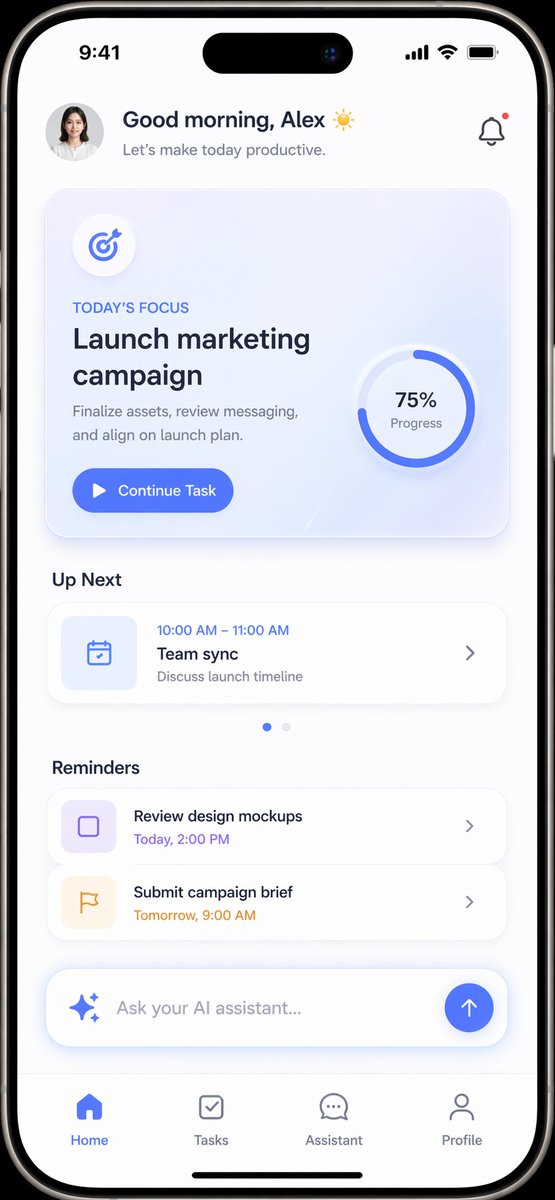
Mockup giao diện ứng dụng tăng năng suất
Prompt tạo mockup giao diện ứng dụng di động hiện đại hỗ trợ tăng hiệu suất làm việc với bố cục trực quan, thẻ tiêu điểm công việc, danh sách nhắc nhở và thanh nhập liệu AI.
Bản tiếng Anh
{
  "type": "mobile app UI mockup",
  "device": "modern smartphone with dynamic island",
  "theme": "light mode, minimalist, {argument name="primary color" default="soft blue"} accents, soft drop shadows",
  "layout": {
    "header": {
      "profile": "small circular photo of a woman",
      "greeting": "Good morning, {argument name="user name" default="Alex"} ☀️",
      "subtitle": "Let's make today productive.",
      "icon": "notification bell with red dot"
    },
    "hero_card": {
      "title": "TODAY'S FOCUS",
      "headline": "{argument name="focus task" default="Launch marketing campaign"}",
      "description": "Finalize assets, review messaging, and align on launch plan.",
      "button": "Continue Task",
      "graphic": "circular progress ring showing 75% Progress"
    },
    "sections": [
      {
        "title": "Up Next",
        "count": 1,
        "items": ["Team sync (10:00 AM - 11:00 AM)"]
      },
      {
        "title": "Reminders",
        "count": 2,
        "items": ["Review design mockups", "Submit campaign brief"]
      }
    ],
    "bottom_elements": {
      "ai_input": "pill-shaped text field with sparkle icon and placeholder '{argument name="ai placeholder" default="Ask your AI assistant..."}'",
      "navigation_bar": {
        "count": 4,
        "tabs": ["Home", "Tasks", "Assistant", "Profile"]
      }
    }
  }
}
Bản tiếng Việt
{
  "type": "mockup giao diện ứng dụng di động",
  "device": "điện thoại thông minh hiện đại với dynamic island",
  "theme": "chế độ sáng, tối giản, điểm nhấn {argument name="primary color" default="soft blue"}, bóng đổ mềm mại",
  "layout": {
    "header": {
      "profile": "ảnh tròn nhỏ chụp một phụ nữ",
      "greeting": "Chào buổi sáng, {argument name="user name" default="Alex"} ☀️",
      "subtitle": "Hãy biến hôm nay thành một ngày làm việc hiệu quả.",
      "icon": "chuông thông báo có chấm đỏ"
    },
    "hero_card": {
      "title": "TRỌNG TÂM HÔM NAY",
      "headline": "{argument name="focus task" default="Launch marketing campaign"}",
      "description": "Hoàn thiện tài nguyên, rà soát thông điệp và thống nhất kế hoạch ra mắt.",
      "button": "Tiếp tục nhiệm vụ",
      "graphic": "vòng tiến độ hình tròn hiển thị 75% Tiến độ"
    },
    "sections": [
      {
        "title": "Tiếp theo",
        "count": 1,
        "items": ["Team sync (10:00 AM - 11:00 AM)"]
      },
      {
        "title": "Lời nhắc",
        "count": 2,
        "items": ["Review design mockups", "Submit campaign brief"]
      }
    ],
    "bottom_elements": {
      "ai_input": "trường nhập văn bản hình viên thuốc với biểu tượng lấp lánh và văn bản gợi ý '{argument name="ai placeholder" default="Ask your AI assistant..."}'",
      "navigation_bar": {
        "count": 4,
        "tabs": ["Home", "Tasks", "Assistant", "Profile"]
      }
    }
  }
}
Mẹo sử dụng
Tùy chỉnh màu sắc điểm nhấn, tên người dùng, nội dung nhiệm vụ trọng tâm và danh sách lời nhắc để tạo giao diện phù hợp với ứng dụng của bạn.
Nguồn và quyền sử dụng
- Nguồn
- https://x.com/Fancyfreer/status/2044789137853792669#reversed-1
- Tác giả gốc
- Daniel
- License prompt
- CC-BY-4.0
- License ảnh
- CC-BY-4.0