
Charts & InfographicsGPT Image 2InfographicChân thựcTối giảnHiện đạiChuyên nghiệp
Infographic quy trình làm việc phần mềm
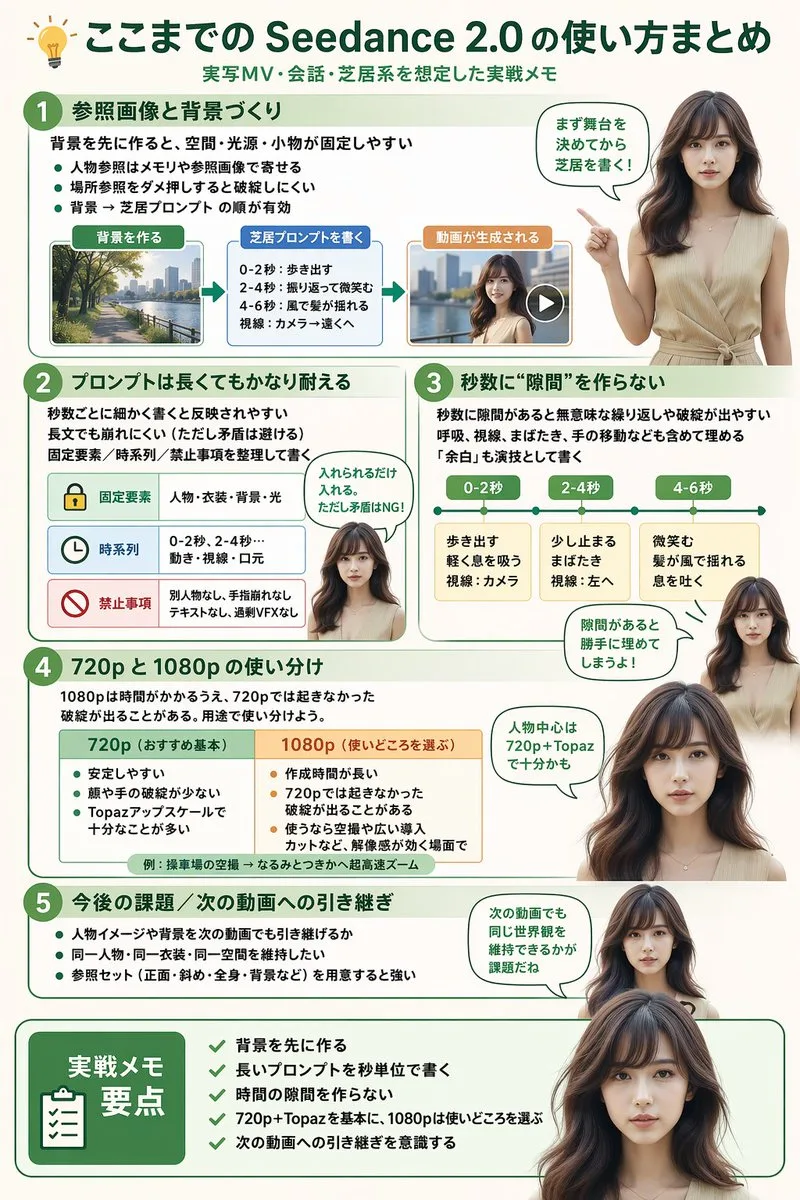
Prompt tạo infographic sơ đồ quy trình làm việc chuyên nghiệp, kết hợp hình ảnh người thuyết trình chân thực. Bố cục phân chia rõ ràng thành các phần với lưu đồ, bảng biểu, dòng thời gian và khung tổng kết.
Bản tiếng Anh
{
  "type": "infographic",
  "style": "clean, modern, professional, soft green and beige color palette, photorealistic character integration",
  "header": {
    "icon": "lightbulb",
    "title": "{argument name="main title" default="ここまでの Seedance 2.0 の使い方まとめ"}",
    "subtitle": "{argument name="subtitle" default="実写MV・会話・芝居系を想定した実践メモ"}"
  },
  "presenter_character": "{argument name="presenter description" default="photorealistic young Japanese woman with long dark brown hair wearing a beige sleeveless top"}",
  "total_presenter_cutouts": 6,
  "layout": {
    "sections": [
      {
        "number": 1,
        "title": "{argument name="section 1 title" default="参照画像と背景づくり"}",
        "elements": "3 bullet points, 1 horizontal 3-step flowchart with thumbnail images (cityscape, text box, video player)",
        "presenter_pose": "pointing left towards the flowchart, with a speech bubble"
      },
      {
        "number": 2,
        "title": "{argument name="section 2 title" default="プロンプトは長くてもかなり耐える"}",
        "elements": "2 bullet points, 1 table with 3 rows featuring icons (lock, clock, prohibition sign)",
        "presenter_pose": "neutral expression, looking forward, with a speech bubble"
      },
      {
        "number": 3,
        "title": "秒数に“隙間”を作らない",
        "elements": "2 bullet points, 1 horizontal timeline graphic with 3 segments",
        "presenter_pose": "pointing up, looking slightly left, with a speech bubble"
      },
      {
        "number": 4,
        "title": "720p と 1080p の使い分け",
        "elements": "text description, 1 two-column comparison table (green column, orange column)",
        "presenter_pose": "looking forward, with a speech bubble"
      },
      {
        "number": 5,
        "title": "今後の課題 / 次の動画への引き継ぎ",
        "elements": "4 bullet points",
        "presenter_pose": "looking slightly right, with a speech bubble"
      },
      {
        "type": "summary_box",
        "title": "実践メモ 要点",
        "elements": "clipboard icon, 5 checklist items with green checkmarks",
        "presenter_pose": "large portrait from chest up, looking directly at viewer"
      }
    ]
  }
}
Bản tiếng Việt
{
  "type": "infographic",
  "style": "sạch sẽ, hiện đại, chuyên nghiệp, bảng màu xanh lá cây và màu be dịu nhẹ, tích hợp nhân vật chân thực như ảnh chụp",
  "header": {
    "icon": "bóng đèn",
    "title": "{argument name="main title" default="ここまでの Seedance 2.0 の使い方まとめ"}",
    "subtitle": "{argument name="subtitle" default="実写MV・会話・芝居系を想定した実践メモ"}"
  },
  "presenter_character": "{argument name="presenter description" default="phụ nữ Nhật Bản trẻ trung chân thực như ảnh chụp với mái tóc dài màu nâu sẫm, mặc áo sát nách màu be"}",
  "total_presenter_cutouts": 6,
  "layout": {
    "sections": [
      {
        "number": 1,
        "title": "{argument name="section 1 title" default="参照画像と背景づくり"}",
        "elements": "3 gạch đầu dòng, 1 lưu đồ 3 bước nằm ngang kèm hình thu nhỏ (cảnh thành phố, hộp văn bản, trình phát video)",
        "presenter_pose": "chỉ tay sang trái về phía lưu đồ, kèm bong bóng thoại"
      },
      {
        "number": 2,
        "title": "{argument name="section 2 title" default="プロンプトは長くてもかなり耐える"}",
        "elements": "2 gạch đầu dòng, 1 bảng gồm 3 hàng có các biểu tượng (ổ khóa, đồng hồ, biển báo cấm)",
        "presenter_pose": "biểu cảm trung tính, nhìn về phía trước, kèm bong bóng thoại"
      },
      {
        "number": 3,
        "title": "Không tạo "khoảng trống" thời lượng",
        "elements": "2 gạch đầu dòng, 1 đồ họa dòng thời gian ngang gồm 3 phân đoạn",
        "presenter_pose": "chỉ tay lên trên, nhìn hơi chếch sang trái, kèm bong bóng thoại"
      },
      {
        "number": 4,
        "title": "Phân biệt và sử dụng hợp lý 720p và 1080p",
        "elements": "mô tả văn bản, 1 bảng so sánh hai cột (cột màu xanh lá, cột màu cam)",
        "presenter_pose": "nhìn về phía trước, kèm bong bóng thoại"
      },
      {
        "number": 5,
        "title": "Nhiệm vụ sắp tới / Bàn giao cho video tiếp theo",
        "elements": "4 gạch đầu dòng",
        "presenter_pose": "nhìn hơi chếch sang phải, kèm bong bóng thoại"
      },
      {
        "type": "summary_box",
        "title": "Điểm mấu chốt trong ghi chú thực hành",
        "elements": "biểu tượng bảng kẹp tài liệu, 5 mục danh sách kiểm tra với dấu tích xanh lá",
        "presenter_pose": "chân dung lớn từ ngực trở lên, nhìn thẳng vào người xem"
      }
    ]
  }
}
Mẹo sử dụng
Tùy chỉnh thông tin mô tả người thuyết trình trong biến 'presenter description' và thay đổi nội dung các phần mục để phù hợp với chủ đề thuyết trình hoặc hướng dẫn kỹ thuật của bạn.
Nguồn và quyền sử dụng
- Nguồn
- https://x.com/malonpon/status/2044957465947844993#reversed-0
- Tác giả gốc
- kuripon
- License prompt
- CC-BY-4.0
- License ảnh
- CC-BY-4.0