
Charts & InfographicsGPT Image 2InfographicCleanCorporateFlat DesignPastel Accents
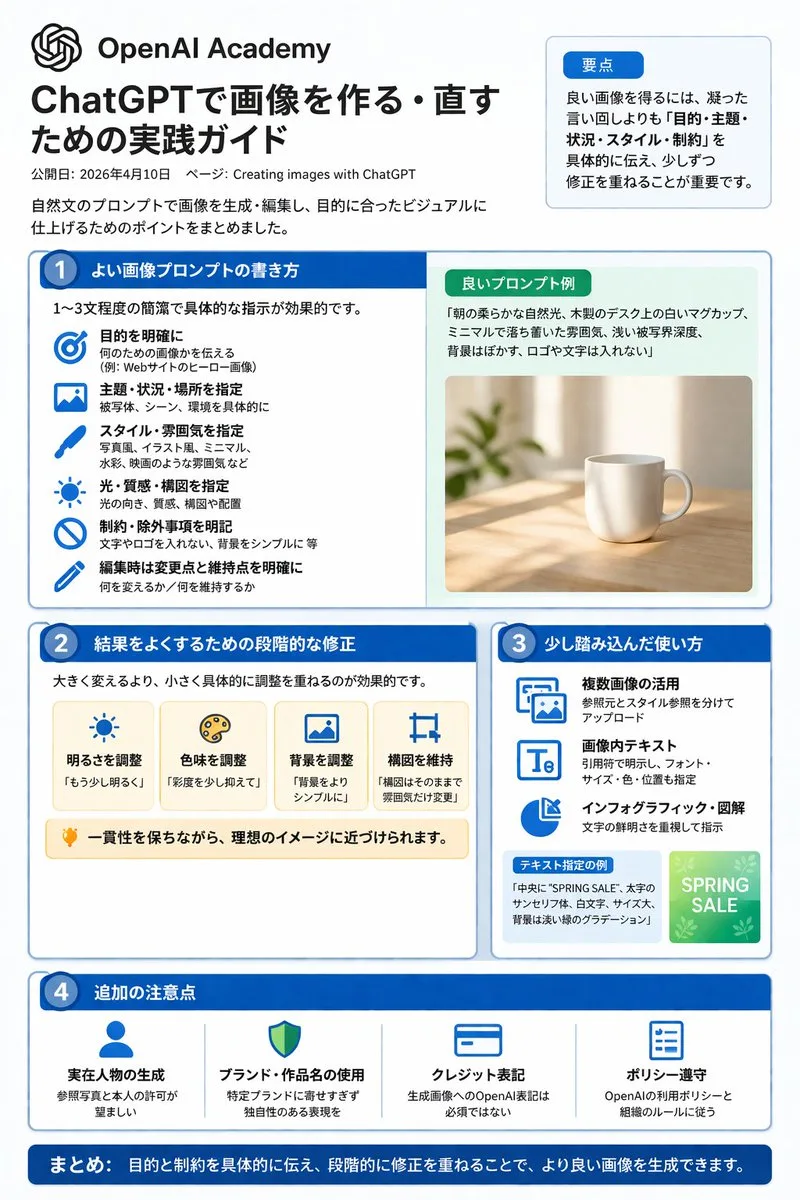
Infographic hướng dẫn tạo ảnh với ChatGPT
Prompt tạo đồ họa thông tin (infographic) phẳng chuyên nghiệp, bố cục nhiều phần hướng dẫn các mẹo và quy trình tạo ảnh với ChatGPT.
Bản tiếng Anh
{"type":"infographic","style":"clean, corporate, flat design, pastel accents, dark blue primary color","header":{"logo":"swirl icon","academy_name":"{argument name="academy name" default="OpenAI Academy"}","main_title":"{argument name="main title" default="ChatGPTで画像を作る・直すための実践ガイド"}","metadata":"date and page info","summary_box":{"title":"要点","content":"paragraph about key points"}},"layout":{"sections":[{"number":1,"title":"{argument name="section 1 title" default="よい画像プロンプトの書き方"}","layout":"two columns","left_column":{"count":6,"items":[{"icon":"target","label":"目的を明確に"},{"icon":"landscape","label":"主題・状況・場所を指定"},{"icon":"brush","label":"スタイル・雰囲気を指定"},{"icon":"sun","label":"光・質感・構図を指定"},{"icon":"prohibition","label":"制約・除外事項を明記"},{"icon":"pencil","label":"編集時は変更点と維持点を明確に"}]},"right_column":{"box_title":"良いプロンプト例","image":"{argument name="example image subject" default="white mug on a wooden desk"}"}},{"number":2,"title":"結果をよくするための段階的な修正","cards":{"count":4,"items":[{"icon":"sun","label":"明るさを調整"},{"icon":"palette","label":"色味を調整"},{"icon":"landscape","label":"背景を調整"},{"icon":"crop","label":"構図を維持"}]},"bottom_banner":"lightbulb icon with text"},{"number":3,"title":"少し踏み込んだ使い方","list":{"count":3,"items":[{"icon":"multiple images","label":"複数画像の活用"},{"icon":"text 'Te'","label":"画像内テキスト"},{"icon":"pie chart","label":"インフォグラフィック・図解"}]},"example_box":{"title":"テキスト指定の例","graphic":"green box with 'SPRING SALE'"}},{"number":4,"title":"追加の注意点","items":{"count":4,"items":[{"icon":"person","label":"実在人物の生成"},{"icon":"shield","label":"ブランド・作品名の使用"},{"icon":"id card","label":"クレジット表記"},{"icon":"checklist","label":"ポリシー遵守"}]}}],"footer":{"style":"dark blue banner","text":"{argument name="footer summary" default="まとめ: 目的と制約を具体的に伝え、段階的に修正を重ねることで、より良い画像を生成できます。"}"}}}Bản tiếng Việt
{"type":"infographic","style":"gọn gàng, phong cách doanh nghiệp, thiết kế phẳng, điểm nhấn màu pastel, màu chủ đạo xanh lam đậm","header":{"logo":"biểu tượng xoáy","academy_name":"{argument name="academy name" default="OpenAI Academy"}","main_title":"{argument name="main title" default="ChatGPTで画像を作る・直すための実践ガイド"}","metadata":"thông tin ngày và trang","summary_box":{"title":"要点","content":"paragraph about key points"}},"layout":{"sections":[{"number":1,"title":"{argument name="section 1 title" default="よい画像プロンプトの書き方"}","layout":"hai cột","left_column":{"count":6,"items":[{"icon":"target","label":"目的を明確に"},{"icon":"landscape","label":"主題・状況・場所を指定"},{"icon":"brush","label":"スタイル・雰囲気を指定"},{"icon":"sun","label":"光・質感・構図を指定"},{"icon":"prohibition","label":"制約・除外事項を明記"},{"icon":"pencil","label":"編集時は変更点と維持点を明確に"}]},"right_column":{"box_title":"Ví dụ prompt tốt","image":"{argument name="example image subject" default="white mug on a wooden desk"}"}},{"number":2,"title":"Chỉnh sửa từng bước để có kết quả tốt hơn","cards":{"count":4,"items":[{"icon":"sun","label":"明るさを調整"},{"icon":"palette","label":"色味を調整"},{"icon":"landscape","label":"背景を調整"},{"icon":"crop","label":"構図を維持"}]},"bottom_banner":"biểu tượng bóng đèn kèm văn bản"},{"number":3,"title":"Cách sử dụng nâng cao hơn","list":{"count":3,"items":[{"icon":"multiple images","label":"複数画像の活用"},{"icon":"text 'Te'","label":"画像内テキスト"},{"icon":"pie chart","label":"インフォグラフィック・図解"}]},"example_box":{"title":"テキスト指定の例","graphic":"green box with 'SPRING SALE'"}},{"number":4,"title":"Các lưu ý bổ sung","items":{"count":4,"items":[{"icon":"person","label":"実在人物の生成"},{"icon":"shield","label":"ブランド・作品名の使用"},{"icon":"id card","label":"クレジット表記"},{"icon":"checklist","label":"ポリシー遵守"}]}}],"footer":{"style":"banner xanh lam đậm","text":"{argument name="footer summary" default="まとめ: 目的と制約を具体的に伝え、段階的に修正を重ねることで、より良い画像を生成できます。"}"}}}Mẹo sử dụng
Thích hợp để thiết kế đồ họa thông tin hướng dẫn, tài liệu đào tạo; có thể thay đổi các giá trị trường để tùy biến nội dung theo từng chủ đề bài viết.
Nguồn và quyền sử dụng
- Nguồn
- https://x.com/super_bonochin/status/2043859866968891617#reversed-1
- Tác giả gốc
- 炎鎮🔥 - ₿onochin -
- License prompt
- CC-BY-4.0
- License ảnh
- CC-BY-4.0