
Charts & InfographicsGPT Image 2InfographicModernCorporateFlat DesignPastel ColorsClean Layout
Infographic 4 Cột Hướng Dẫn Tạo Ảnh Bằng AI
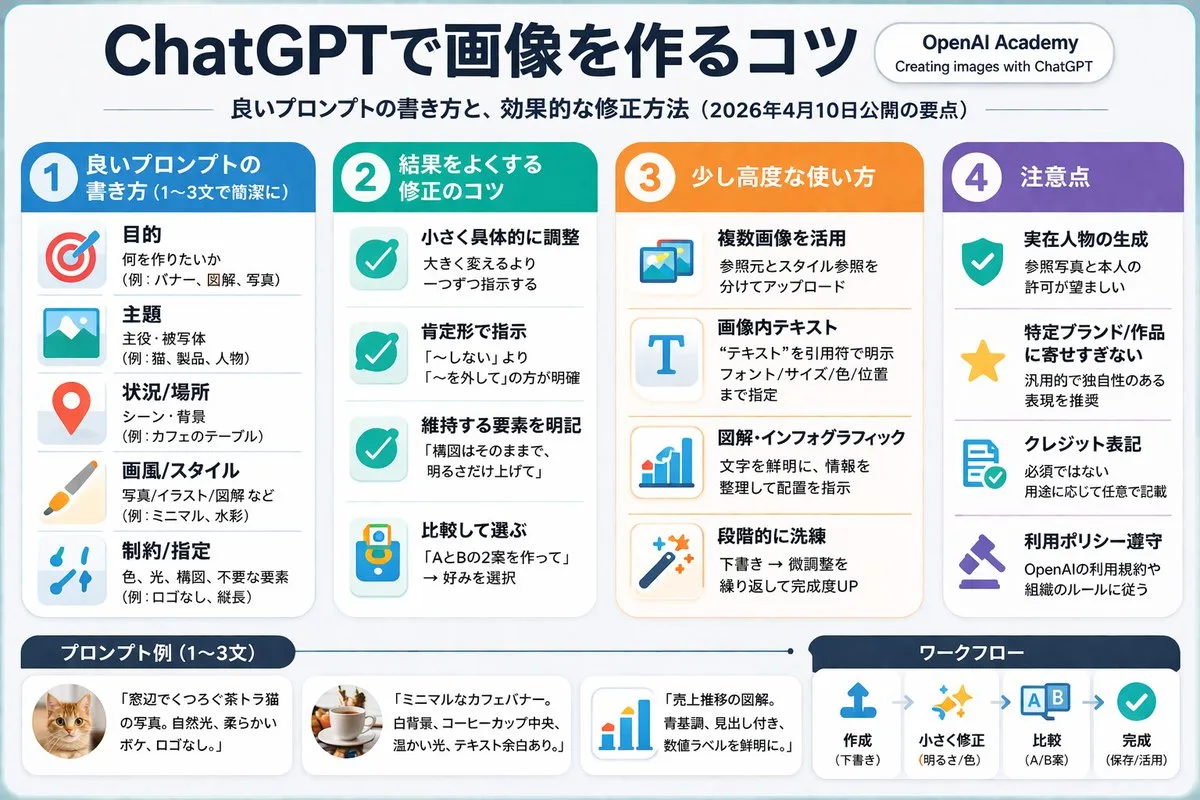
Prompt cấu trúc JSON dùng để thiết kế infographic 4 cột chuyên nghiệp hướng dẫn tạo ảnh bằng AI, sở hữu phong cách phẳng hiện đại và bố cục trực quan.
Bản tiếng Anh
{ "type": "infographic", "style": "clean, corporate, flat design, soft pastel colors, rounded corners, white background", "header": { "main_title": "{argument name="main title" default="ChatGPTで画像を作るコツ"}", "subtitle": "{argument name="subtitle" default="良いプロンプトの書き方と、効果的な修正方法(2026年4月10日公開の要点)"}", "top_right_badge": "OpenAI Academy / Creating images with ChatGPT" }, "layout": { "columns": [ { "color_theme": "blue", "header": "{argument name="column 1 title" default="1 良いプロンプトの書き方 (1〜3文で簡潔に)"}", "item_count": 5, "icons": ["target", "landscape picture", "map pin", "paintbrush", "sliders"] }, { "color_theme": "green", "header": "{argument name="column 2 title" default="2 結果をよくする修正のコツ"}", "item_count": 4, "icons": ["checkmark", "checkmark", "checkmark", "A/B comparison"] }, { "color_theme": "orange", "header": "3 少し高度な使い方", "item_count": 4, "icons": ["multiple images", "letter T", "bar chart", "magic wand"] }, { "color_theme": "purple", "header": "4 注意点", "item_count": 4, "icons": ["shield with check", "star", "document with check", "gavel"] } ], "footer": { "left_section": { "title": "{argument name="bottom left title" default="プロンプト例 (1〜3文)"}", "item_count": 3, "thumbnails": ["orange tabby cat", "coffee cup on white background", "blue bar chart"] }, "right_section": { "title": "ワークフロー", "step_count": 4, "icons": ["upload arrow", "sparkles", "A/B boxes", "checkmark"], "flow_style": "horizontal with dashed arrows" } } } }Bản tiếng Việt
{ "type": "infographic", "style": "sạch sẽ, phong cách doanh nghiệp, thiết kế phẳng, màu pastel nhẹ nhàng, góc bo tròn, nền trắng", "header": { "main_title": "{argument name="main title" default="ChatGPTで画像を作るコツ"}", "subtitle": "{argument name="subtitle" default="良いプロンプトの書き方と、効果的な修正方法(2026年4月10日公開の要点)"}", "top_right_badge": "OpenAI Academy / Tạo hình ảnh với ChatGPT" }, "layout": { "columns": [ { "color_theme": "xanh dương", "header": "{argument name="column 1 title" default="1 良いプロンプトの書き方 (1〜3文で簡潔に)"}", "item_count": 5, "icons": ["target", "landscape picture", "map pin", "paintbrush", "sliders"] }, { "color_theme": "xanh lá", "header": "{argument name="column 2 title" default="2 結果をよくする修正のコツ"}", "item_count": 4, "icons": ["checkmark", "checkmark", "checkmark", "A/B comparison"] }, { "color_theme": "cam", "header": "3 Cách sử dụng nâng cao", "item_count": 4, "icons": ["multiple images", "letter T", "bar chart", "magic wand"] }, { "color_theme": "tím", "header": "4 Lưu ý", "item_count": 4, "icons": ["shield with check", "star", "document with check", "gavel"] } ], "footer": { "left_section": { "title": "{argument name="bottom left title" default="プロンプト例 (1〜3文)"}", "item_count": 3, "thumbnails": ["orange tabby cat", "coffee cup on white background", "blue bar chart"] }, "right_section": { "title": "Quy trình làm việc", "step_count": 4, "icons": ["upload arrow", "sparkles", "A/B boxes", "checkmark"], "flow_style": "dạng ngang với mũi tên nét đứt" } } } }Mẹo sử dụng
Tùy biến nội dung tiêu đề và mô tả trong từng cột để phù hợp với chủ đề hướng dẫn của bạn. Có thể thay đổi tông màu (color_theme) của các cột để phân biệt nhóm thông tin trực quan hơn.
Nguồn và quyền sử dụng
- Nguồn
- https://x.com/super_bonochin/status/2043859866968891617#reversed-0
- Tác giả gốc
- 炎鎮🔥 - ₿onochin -
- License prompt
- CC-BY-4.0
- License ảnh
- CC-BY-4.0