
Charts & InfographicsGPT Image 2High ContrastPresentation SlideDark TechInfographicVectorFuturisticModern UINeon Glow
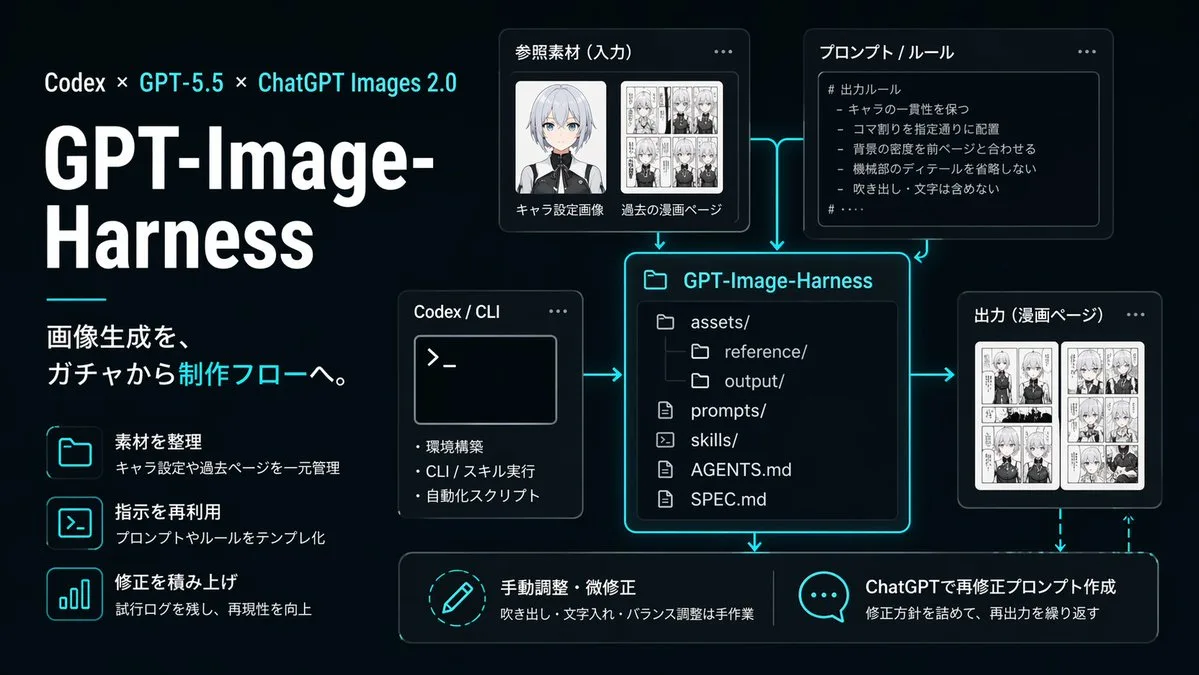
Infographic quy trình tạo ảnh AI phong cách neon
Prompt tạo slide infographic quy trình công nghệ giao diện tối với hiệu ứng ánh sáng neon lục lam, mô phỏng luồng tạo ảnh AI chuyên nghiệp. Sơ đồ trực quan hóa chi tiết các bước từ dữ liệu đầu vào, thiết lập quy tắc đến lưu trữ và tinh chỉnh thủ công.
Bản tiếng Anh
{"type":"dark tech workflow infographic","style":"clean futuristic presentation slide, black to deep navy gradient background, neon cyan glow accents, thin cyan connector arrows, modern UI cards with rounded corners, subtle shadows, high contrast white typography, polished startup branding aesthetic","canvas":{"aspect_ratio":"16:9","composition":"left-aligned title block with modular diagram on the right and bottom"},"branding":{"topline":"Codex × GPT-5.5 × ChatGPT Images 2.0","title":"GPT-Image-Harness","subtitle":"画像生成を、ガチャから制作フローへ。"},"layout":{"sections":[{"title":"left feature list","position":"left column","count":3,"labels":["素材を整理","指示を再利用","修正を積み上げ"]},{"title":"参照素材(入力)","position":"upper center-left","count":2,"labels":["キャラ設定画像","過去の漫画ページ"]},{"title":"プロンプト / ルール","position":"upper center-right","count":1,"labels":["# 出力ルール"]},{"title":"Codex / CLI","position":"middle left of center","count":3,"labels":["環境構築","CLI / スキル実行","自動化スクリプト"]},{"title":"GPT-Image-Harness","position":"center","count":6,"labels":["assets/","reference/","output/","prompts/","skills/","AGENTS.md","SPEC.md"]},{"title":"出力(漫画ページ)","position":"middle right","count":1,"labels":["漫画ページ"]},{"title":"bottom actions","position":"bottom row","count":2,"labels":["手動調整・微修正","ChatGPTで再修正プロンプト作成"]}]},"left_panel":{"headline_scale":"very large","title_weight":"bold extra-heavy","decorative_line":"short horizontal cyan line under title block","feature_items":[{"icon":"folder outline glowing cyan","title":"素材を整理","description":"キャラ設定や過去ページを一元管理"},{"icon":"terminal window outline glowing cyan","title":"指示を再利用","description":"プロンプトやルールをテンプレ化"},{"icon":"bar chart outline glowing cyan","title":"修正を積み上げ","description":"試行ログを残し、再現性を向上"}]},"diagram":{"nodes":[{"kind":"input card","title":"参照素材(入力)","visual":"two thumbnail areas, one anime character bust portrait with face softly blurred, one black-and-white manga page collage"},{"kind":"rule card","title":"プロンプト / ルール","visual":"bullet list inside code-like panel","body_text":["# 出力ルール","- キャラの一貫性を保つ","- コマ割りを指定通りに配置","- 背景の密度を前ページと合わせる","- 機械部のディテールを省略しない","- 吹き出し・文字は含めない"]},{"kind":"tool card","title":"Codex / CLI","visual":"terminal window with prompt symbol >_ and three bullet points"},{"kind":"repository card","title":"GPT-Image-Harness","visual":"large central file-tree panel with glowing cyan border"},{"kind":"output card","title":"出力(漫画ページ)","visual":"two manga page thumbnails side by side"},{"kind":"action card","title":"手動調整・微修正","visual":"circular pencil icon","description":"吹き出し・文字入れ・バランス調整は手作業"},{"kind":"action card","title":"ChatGPTで再修正プロンプト作成","visual":"speech bubble icon with three dots","description":"修正方針を詰めて、再出力を繰り返す"}],"connectors":"cyan glowing arrows connecting input, rules, and CLI into the central repository card; arrows from repository to output and downward to the two bottom action cards; dashed cyan feedback arrow looping from output back toward the bottom-right action area"},"typography":{"language":"Japanese","title_color":"white","accent_color":"bright cyan","body_color":"light gray-white"},"lighting":"soft neon edge glow around cards and icons","quality":"crisp vector-like infographic, presentation-ready, precise alignment, no watermarks"}Bản tiếng Việt
{"type":"infographic quy trình công nghệ giao diện tối","style":"slide thuyết trình tương lai tinh gọn, nền chuyển sắc từ đen sang xanh navy đậm, điểm nhấn ánh sáng neon lục lam, các mũi tên kết nối mỏng màu lục lam, thẻ giao diện người dùng hiện đại bo góc, đổ bóng tinh tế, kiểu chữ trắng tương phản cao, thẩm mỹ nhận diện thương hiệu startup chỉn chu","canvas":{"aspect_ratio":"16:9","composition":"khối tiêu đề căn lề trái với sơ đồ dạng mô-đun ở bên phải và phía dưới"},"branding":{"topline":"Codex × GPT-5.5 × ChatGPT Images 2.0","title":"GPT-Image-Harness","subtitle":"Tạo ảnh, từ gacha thành quy trình sản xuất."},"layout":{"sections":[{"title":"left feature list","position":"left column","count":3,"labels":["素材を整理","指示を再利用","修正を積み上げ"]},{"title":"参照素材(入力)","position":"upper center-left","count":2,"labels":["キャラ設定画像","過去の漫画ページ"]},{"title":"プロンプト / ルール","position":"upper center-right","count":1,"labels":["# 出力ルール"]},{"title":"Codex / CLI","position":"ở giữa lệch sang trái của trung tâm","count":3,"labels":["環境構築","CLI / スキル実行","自動化スクリプト"]},{"title":"GPT-Image-Harness","position":"chính giữa","count":6,"labels":["assets/","reference/","output/","prompts/","skills/","AGENTS.md","SPEC.md"]},{"title":"出力(漫画ページ)","position":"middle right","count":1,"labels":["漫画ページ"]},{"title":"các hành động phía dưới","position":"hàng dưới cùng","count":2,"labels":["手動調整・微修正","ChatGPTで再修正プロンプト作成"]}]},"left_panel":{"headline_scale":"rất lớn","title_weight":"đậm siêu dày","decorative_line":"đường ngang ngắn màu lục lam bên dưới khối tiêu đề","feature_items":[{"icon":"folder outline glowing cyan","title":"素材を整理","description":"キャラ設定や過去ページを一元管理"},{"icon":"terminal window outline glowing cyan","title":"指示を再利用","description":"プロンプトやルールをテンプレ化"},{"icon":"bar chart outline glowing cyan","title":"修正を積み上げ","description":"試行ログを残し、再現性を向上"}]},"diagram":{"nodes":[{"kind":"thẻ đầu vào","title":"Tài liệu tham khảo (Đầu vào)","visual":"hai khu vực hình thu nhỏ, một ảnh chân dung bán thân nhân vật anime với khuôn mặt được làm mờ nhẹ, một bản cắt dán trang truyện tranh manga đen trắng"},{"kind":"thẻ quy tắc","title":"Prompt / Quy tắc","visual":"danh sách dấu đầu dòng bên trong bảng điều khiển dạng mã lệnh","body_text":["# 出力ルール","- キャラの一貫性を保つ","- コマ割りを指定通りに配置","- 背景の密度を前ページと合わせる","- 機械部のディテールを省略しない","- 吹き出し・文字は含めない"]},{"kind":"thẻ công cụ","title":"Codex / CLI","visual":"cửa sổ dòng lệnh terminal với biểu tượng dấu nhắc >_ và ba dấu đầu dòng"},{"kind":"thẻ kho lưu trữ","title":"GPT-Image-Harness","visual":"bảng cây thư mục lớn ở trung tâm với đường viền phát sáng màu lục lam"},{"kind":"output card","title":"出力(漫画ページ)","visual":"two manga page thumbnails side by side"},{"kind":"thẻ hành động","title":"Điều chỉnh thủ công / tinh chỉnh nhỏ","visual":"biểu tượng bút chì hình tròn","description":"Bóng thoại, chèn chữ và cân chỉnh cân bằng được thực hiện thủ công"},{"kind":"thẻ hành động","title":"Tạo prompt sửa đổi bằng ChatGPT","visual":"biểu tượng bong bóng lời thoại với ba dấu chấm","description":"Hoàn thiện phương hướng chỉnh sửa và lặp lại việc xuất ảnh"}],"connectors":"các mũi tên phát sáng màu lục lam kết nối đầu vào, quy tắc và CLI vào thẻ kho lưu trữ trung tâm; các mũi tên từ kho lưu trữ đến đầu ra và hướng xuống hai thẻ hành động ở dưới cùng; mũi tên phản hồi nét đứt màu lục lam uốn cong từ đầu ra quay trở lại khu vực hành động ở góc dưới bên phải"},"typography":{"language":"Tiếng Nhật","title_color":"trắng","accent_color":"xanh lục lam sáng","body_color":"trắng xám nhạt"},"lighting":"ánh sáng viền neon dịu nhẹ xung quanh các thẻ và biểu tượng","quality":"infographic sắc nét dạng vector, sẵn sàng thuyết trình, căn chỉnh chính xác, không có hình mờ"}Mẹo sử dụng
Sử dụng tỷ lệ khung hình 16:9 để tối ưu cho slide thuyết trình hoặc báo cáo kỹ thuật. Bạn có thể tùy chỉnh lại văn bản trên các thẻ hoặc đổi mã màu neon để phù hợp với bộ nhận diện thương hiệu cá nhân.
Nguồn và quyền sử dụng
- Nguồn
- https://x.com/kotsu_kotsu_san/status/2047985664189464819#reversed-2
- Tác giả gốc
- みかみ.ai|AI発信と個人開発
- License prompt
- CC-BY-4.0
- License ảnh
- CC-BY-4.0