
Charts & InfographicsGPT Image 2ModernUI MockupCleanDark ModeDigital Design
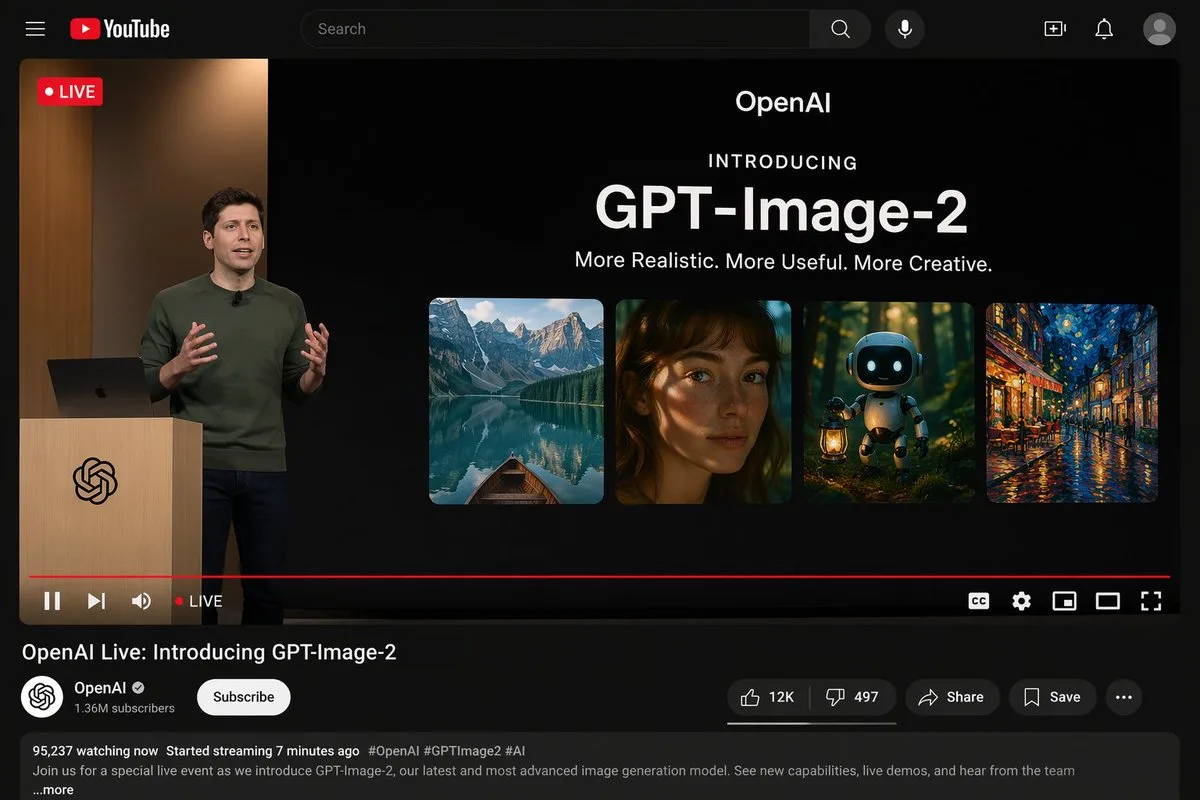
Mockup giao diện phát trực tiếp YouTube
Prompt tạo mockup giao diện phát trực tiếp YouTube ở chế độ tối, mô phỏng buổi ra mắt sản phẩm công nghệ với người thuyết trình và bộ sưu tập hình ảnh. Thiết kế chi tiết bao gồm đầy đủ thanh điều hướng, trình phát video và phần thông tin kênh.
Bản tiếng Anh
{"type": "YouTube Live Stream UI mockup", "theme": "dark mode", "layout": {"top_bar": {"components": ["hamburger menu", "YouTube logo", "search bar", "microphone icon", "create icon", "notifications icon", "profile avatar"]}, "video_player": {"status": "LIVE badge in top left", "left_side": "A {argument name="presenter description" default="man in a green sweater"} standing at a wooden podium with a spiral logo, gesturing with hands, laptop on podium.", "right_side_presentation": {"text_elements": ["OpenAI", "INTRODUCING", "{argument name="product name" default="GPT-Image-2"}", "{argument name="tagline" default="More Realistic. More Useful. More Creative."}"], "image_gallery": {"count": 4, "panels": ["mountain lake with a boat", "close-up portrait of a woman with dappled lighting", "cute robot holding a lantern in a dark forest", "impressionist painting of a glowing city street at night"]}}, "bottom_controls": {"components": ["play/pause", "next", "volume", "LIVE text", "red progress bar", "CC", "settings gear", "miniplayer", "theater mode", "fullscreen"]}}, "video_info": {"title": "{argument name="video title" default="OpenAI Live: Introducing GPT-Image-2"}", "channel_section": {"name": "{argument name="channel name" default="OpenAI"}", "badge": "verified checkmark", "subscribers": "1.36M subscribers", "button": "Subscribe (white pill button)"}, "action_buttons": {"count": 5, "labels": ["Like (12K)", "Dislike (497)", "Share", "Save", "..."]}, "description_box": {"metadata": "95,237 watching now, Started streaming 7 minutes ago", "hashtags": "#OpenAI #GPTImage2 #AI", "body_text": "Join us for a special live event as we introduce GPT-Image-2, our latest and most advanced image generation model. See new capabilities, live demos, and hear from the team ...more"}}}}Bản tiếng Việt
{"type": "Mockup giao diện YouTube Live Stream", "theme": "chế độ tối", "layout": {"top_bar": {"components": ["menu hamburger", "logo YouTube", "thanh tìm kiếm", "biểu tượng micro", "biểu tượng tạo", "biểu tượng thông báo", "ảnh đại diện hồ sơ"]}, "video_player": {"status": "huy hiệu TRỰC TIẾP ở góc trên bên trái", "left_side": "Một {argument name="presenter description" default="man in a green sweater"} đang đứng tại bục gỗ có logo hình xoắn ốc, đang ra hiệu bằng tay, máy tính xách tay trên bục giảng.", "right_side_presentation": {"text_elements": ["OpenAI", "GIỚI THIỆU", "{argument name="product name" default="GPT-Image-2"}", "{argument name="tagline" default="More Realistic. More Useful. More Creative."}"], "image_gallery": {"count": 4, "panels": ["hồ nước trên núi có một chiếc thuyền", "chân dung cận cảnh một người phụ nữ với ánh sáng loang lổ", "chú robot dễ thương cầm đèn lồng trong khu rừng tối", "bức tranh trường phái ấn tượng về một con phố rực rỡ ánh đèn vào ban đêm"]}}, "bottom_controls": {"components": ["phát/tạm dừng", "tiếp theo", "âm lượng", "chữ TRỰC TIẾP", "thanh tiến trình màu đỏ", "phụ đề CC", "bánh răng cài đặt", "trình phát thu nhỏ", "chế độ rạp chiếu phim", "toàn màn hình"]}}, "video_info": {"title": "{argument name="video title" default="OpenAI Live: Introducing GPT-Image-2"}", "channel_section": {"name": "{argument name="channel name" default="OpenAI"}", "badge": "dấu tích xác minh", "subscribers": "1,36 triệu người đăng ký", "button": "Đăng ký (nút màu trắng hình viên thuốc)"}, "action_buttons": {"count": 5, "labels": ["Like (12K)", "Dislike (497)", "Share", "Save", "..."]}, "description_box": {"metadata": "95.237 người đang xem, Đã bắt đầu phát trực tiếp 7 phút trước", "hashtags": "#OpenAI #GPTImage2 #AI", "body_text": "Hãy tham gia cùng chúng tôi trong sự kiện trực tiếp đặc biệt khi chúng tôi giới thiệu GPT-Image-2, mô hình tạo hình ảnh mới nhất và tiên tiến nhất của chúng tôi. Xem các tính năng mới, bản demo trực tiếp và lắng nghe chia sẻ từ đội ngũ phát triển ...thêm"}}}}Mẹo sử dụng
Tùy biến các trường trong cấu trúc JSON như tên kênh, tiêu đề sự kiện và danh sách mô tả hình ảnh để tạo giao diện livestream theo đúng chủ đề mong muốn.
Nguồn và quyền sử dụng
- Nguồn
- https://x.com/BubbleBrain/status/2044686510428221683#reversed-0
- Tác giả gốc
- BubbleBrain
- License prompt
- CC-BY-4.0
- License ảnh
- CC-BY-4.0