
Charts & InfographicsGPT Image 2UI MockupDigital LayoutWeb DesignwikiHow StyleInstructionalInfographic
Mockup bài viết hướng dẫn wikiHow
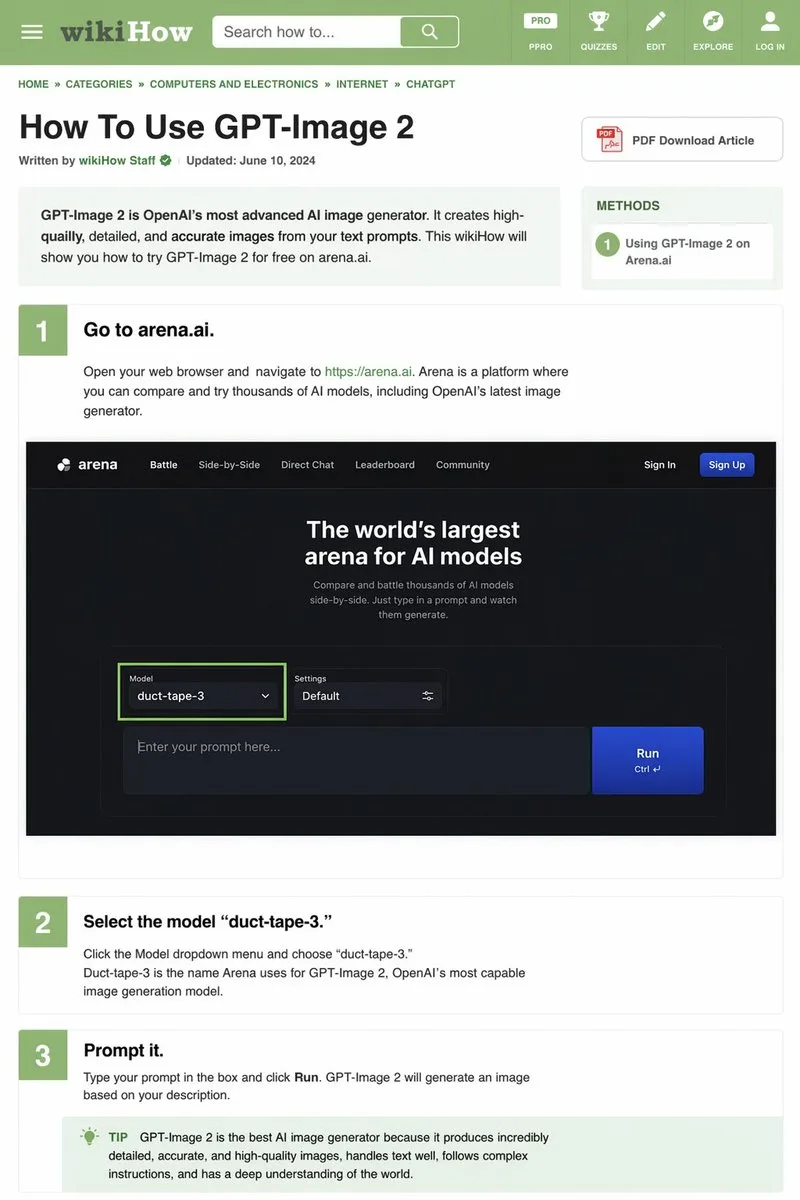
Prompt có cấu trúc JSON chi tiết dùng để tạo mockup bài viết hướng dẫn theo phong cách wikiHow, bao gồm thanh điều hướng, các bước thực hiện và ảnh minh họa giao diện. Thích hợp cho thiết kế đồ họa thông tin và tài liệu hướng dẫn trực quan.
Bản tiếng Anh
{
  "type": "wikiHow article mockup",
  "header": {
    "background": "green",
    "elements": [
      "hamburger menu icon",
      "wikiHow logo",
      "search bar with 'Search how to...' text",
      "5 navigation icons: PRO/PPRO, QUIZZES, EDIT, EXPLORE, LOG IN"
    ]
  },
  "breadcrumbs": "HOME » CATEGORIES » COMPUTERS AND ELECTRONICS » INTERNET » CHATGPT",
  "article_info": {
    "title": "{argument name="article title" default="How To Use GPT-Image 2"}",
    "metadata": "Written by wikiHow Staff | Updated: June 10, 2024",
    "sidebar": [
      "PDF Download Article button",
      "METHODS box: 1 Using GPT-Image 2 on Arena.ai"
    ]
  },
  "intro_box": "GPT-Image 2 is OpenAI's most advanced AI image generator. It creates high-quailly, detailed, and accurate images from your text prompts. This wikiHow will show you how to try GPT-Image 2 for free on arena.ai.",
  "steps": [
    {
      "number": 1,
      "title": "{argument name="step 1 title" default="Go to arena.ai."}",
      "description": "Open your web browser and navigate to https://arena.ai. Arena is a platform where you can compare and try thousands of AI models, including OpenAI's latest image generator.",
      "embedded_image": {
        "type": "dark mode website UI mockup",
        "logo": "arena",
        "navigation": ["Battle", "Side-by-Side", "Direct Chat", "Leaderboard", "Community", "Sign In", "Sign Up button"],
        "hero_text": "The world's largest arena for AI models",
        "input_ui": {
          "model_dropdown": "Model: {argument name="model name" default="duct-tape-3"}",
          "settings": "Default",
          "text_input": "Enter your prompt here...",
          "button": "Run"
        }
      }
    },
    {
      "number": 2,
      "title": "{argument name="step 2 title" default="Select the model 'duct-tape-3.'"}",
      "description": "Click the Model dropdown menu and choose 'duct-tape-3.' Duct-tape-3 is the name Arena uses for GPT-Image 2, OpenAI's most capable image generation model."
    },
    {
      "number": 3,
      "title": "{argument name="step 3 title" default="Prompt it."}",
      "description": "Type your prompt in the box and click Run. GPT-Image 2 will generate an image based on your description.",
      "tip_box": "TIP GPT-Image 2 is the best AI image generator because it produces incredibly detailed, accurate, and high-quality images, handles text well, follows complex instructions, and has a deep understanding of the world."
    }
  ]
}
Bản tiếng Việt
{
  "type": "mockup bài viết wikiHow",
  "header": {
    "background": "xanh lá cây",
    "elements": [
      "biểu tượng menu hamburger",
      "logo wikiHow",
      "thanh tìm kiếm với văn bản 'Search how to...'",
      "5 biểu tượng điều hướng: PRO/PPRO, QUIZZES, EDIT, EXPLORE, LOG IN"
    ]
  },
  "breadcrumbs": "TRANG CHỦ » DANH MỤC » MÁY TÍNH VÀ ĐIỆN TỬ » INTERNET » CHATGPT",
  "article_info": {
    "title": "{argument name="article title" default="How To Use GPT-Image 2"}",
    "metadata": "Được viết bởi Đội ngũ wikiHow | Cập nhật: 10 tháng 6, 2024",
    "sidebar": [
      "Nút Tải xuống bài viết PDF",
      "Hộp PHƯƠNG PHÁP: 1 Sử dụng GPT-Image 2 trên Arena.ai"
    ]
  },
  "intro_box": "GPT-Image 2 là công cụ tạo hình ảnh AI tiên tiến nhất của OpenAI. Nó tạo ra các hình ảnh chất lượng cao, chi tiết và chính xác từ câu lệnh văn bản của bạn. Bài viết wikiHow này sẽ hướng dẫn bạn cách dùng thử GPT-Image 2 miễn phí trên arena.ai.",
  "steps": [
    {
      "number": 1,
      "title": "{argument name="step 1 title" default="Go to arena.ai."}",
      "description": "Mở trình duyệt web của bạn và điều hướng đến https://arena.ai. Arena là nền tảng nơi bạn có thể so sánh và dùng thử hàng nghìn mô hình AI, bao gồm cả công cụ tạo hình ảnh mới nhất của OpenAI.",
      "embedded_image": {
        "type": "mockup giao diện website chế độ tối",
        "logo": "arena",
        "navigation": ["Battle", "Side-by-Side", "Direct Chat", "Leaderboard", "Community", "Sign In", "Sign Up button"],
        "hero_text": "Đấu trường lớn nhất thế giới dành cho các mô hình AI",
        "input_ui": {
          "model_dropdown": "Model: {argument name="model name" default="duct-tape-3"}",
          "settings": "Mặc định",
          "text_input": "Nhập câu lệnh của bạn tại đây...",
          "button": "Chạy"
        }
      }
    },
    {
      "number": 2,
      "title": "{argument name="step 2 title" default="Select the model 'duct-tape-3.'"}",
      "description": "Nhấp vào menu thả xuống Model và chọn 'duct-tape-3.' Duct-tape-3 là tên mà Arena sử dụng cho GPT-Image 2, mô hình tạo hình ảnh mạnh mẽ nhất của OpenAI."
    },
    {
      "number": 3,
      "title": "{argument name="step 3 title" default="Prompt it."}",
      "description": "Nhập câu lệnh của bạn vào ô và nhấp vào Chạy. GPT-Image 2 sẽ tạo một hình ảnh dựa trên mô tả của bạn.",
      "tip_box": "MẸO GPT-Image 2 là công cụ tạo hình ảnh AI tốt nhất vì nó tạo ra những hình ảnh vô cùng chi tiết, chính xác và chất lượng cao, xử lý tốt văn bản, tuân theo các chỉ dẫn phức tạp và có hiểu biết sâu sắc về thế giới."
    }
  ]
}
Mẹo sử dụng
Thay thế các mã giữ chỗ bằng nội dung tiêu đề và các bước cụ thể theo nhu cầu. Có thể tùy biến các thành phần trong sidebar và giao diện nhúng để phù hợp với từng bài hướng dẫn.
Nguồn và quyền sử dụng
- Nguồn
- https://x.com/Kittymanagmgf/status/2044521189343637602#reversed-0
- Tác giả gốc
- Keyboard81727
- License prompt
- CC-BY-4.0
- License ảnh
- CC-BY-4.0